Charter Operators · Part 135
One system for the whole operation, built around how you fly.
Quotes, trips, crew and duty in one system, shaped around how you fly. Most of it is already built, so you go live fast.

Real Vanilla screens · demo data
Every part of a Part 135 operation.
Real Vanilla screens, on a demo operator’s data. Pick an area.
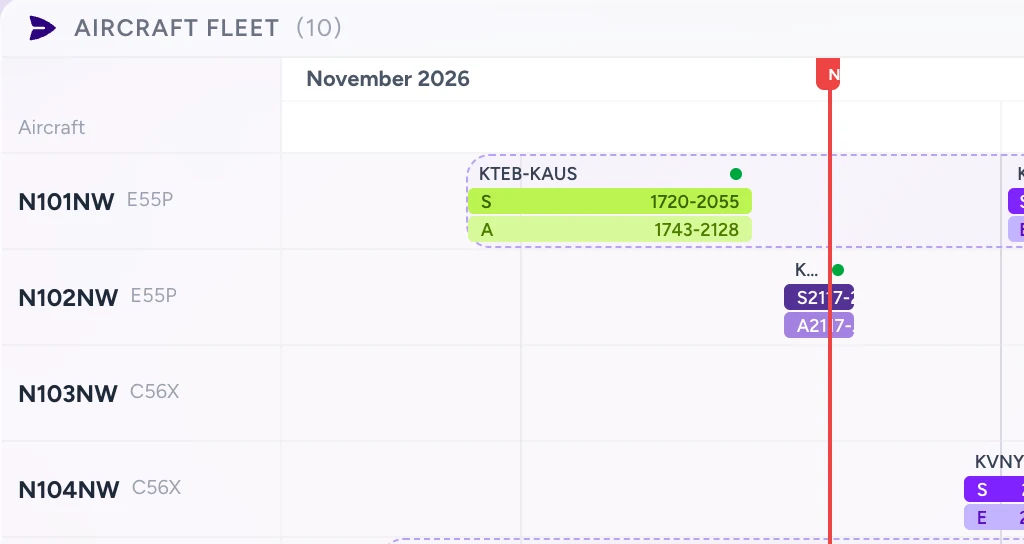
Schedule
Every aircraft and every crew member, on one timeline.
- Filter by status, type, customer or aircraft
- The whole fleet, by the day or the week
- Each leg on its aircraft, with its route and times
- Crew duty and rest on the same board

Operations Center
The whole operation, live, on one screen.
- Active, airborne and on-ground counts, refreshed every 30 seconds
- Every flight on the map, with its route and ETA
- The next departures listed beside the map

Crew
Every licence and type rating, with its expiry.
- Licences, type ratings and certificates for each crew member
- The licence number on file
- Each one’s status at a glance
- When it was issued and when it expires

Maintenance
Every work order, from scheduled to AOG.
- Every work order on its aircraft
- Scheduled, unscheduled, service bulletin or modification, by system
- Status from planned to completed, deferred when it must be
- Priority, up to AOG

Safety
Safety reports, filed and followed through.
- Every occurrence reported, from bird strikes to crew fatigue
- Classified by type and severity
- Followed from submitted to closed
- Filter by status, severity or type

Quotes
Every quote, its status and its value.
- Every quote by customer and aircraft
- Draft, sent and accepted at a glance
- The total, and how long each quote is valid

Documents
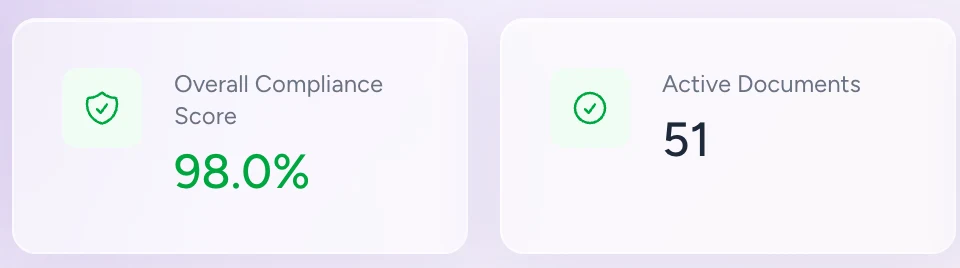
Currency and documents, never a surprise.
- One compliance score across every document
- Expiring and expired documents, counted
- Every document by category, from regulatory to training
- What expires in the next 30 days, listed

Finance
Costs, revenue and profit, month by month.
- Total costs, revenue and net profit
- Cost per flight hour
- Every month side by side
- Filter by date range, aircraft or customer

Everything in Vanilla for a charter operator.
Every module here is in Vanilla today, and we shape each one around how you work. You own the code and the data.
39
modules in Vanilla
- Operations Center
- Trip planning
- Flight timeline
- Dispatch
- Post-flight logs
- Airports
- Leads
- Customers
- Quotes
- Charter agreements
- Broker partners and commissions
- Roster
- Duty records
- Qualifications
- Training
- Medicals
- Aircraft
- Work orders
- Maintenance schedules
- Tech log
- AD and SB compliance
- Life-limited parts
- Safety reports
- Risk assessments
- Safety actions
- Documents
- Document compliance
- Regulatory schemes
- Ground handlers
- Permits
- Fuel suppliers
- Catering
- Transport
- Financial analytics
- Fleet utilisation
- AI assistant
- Scheduled reports
- Owner portal
- Team chat
41
AI tools, built in
Ask Vanilla’s assistant in plain words, and it answers and acts with these tools, on your own data, in your own instance.
- Trip building and legs
- Flight updates and status
- Trip sheets, as PDF
- Passengers and their profiles
- Permits
- Hotels, transport and catering bookings
- Fuel planning
- Weight and balance
- Airport suitability for the aircraft
- METAR
- TAF
- NOTAMs
- Sunrise and sunset
- Crew assignment and FTL checks
- Crew qualifications, medicals and duty
- Handler search, comparison and booking
- Handling fees
- Airport fees and taxes
- Fuel prices, SAF included
- Catering cost estimates
- Leads and the pipeline
- Quotes, from draft to accepted
- Invoices and payments
- Costs and revenue per flight
- Cost and profitability analysis
- Maintenance and airworthiness
- Safety reports
- Fleet analysis
- Document expiry and compliance
- Regulatory scheme compliance
- Emissions: CORSIA, ETS, EPA, DEFRA
- Route analysis
- Trends over time
- Search across everything
- Knows the page you are on
- Times in any timezone or airport
- Calculations
- Unit conversion
- Charts from your data
- Answers from your own data, read-only
- Query checking
32
systems we connect
Your current tools stay. We connect your system to the ones you run as part of tailoring it.
- Avinode
- Aviapages
- Charter Pad
- Returnjet
- XO
- Mirai Flights
- CAMP
- Traxxall
- Veryon
- AMOS
- ForeFlight
- EuroFPL
- RocketRoute
- PPS Flight Planning
- ARGUS
- WYVERN
- Centrik
- PULSAR
- Comply365
- FuelerLinx
- EJS
- World Fuel Services
- Avfuel
- FlightBridge
- Universal Weather & Aviation
- JETEX
- eAPIS (CBP)
- TSA
- paxfiles
- QuickBooks
- DocuSign
- Stripe
How fast can we go live?
Fast, because most of what an operation like yours needs is already built. On the call we look at what you need on top of it, and give you a date.
Can we bring our history with us?
Your aircraft, crew, customers and trip history can come with you. We plan the move together, so the new system starts with your operation already in it.
Who helps us out of hours?
Tell us the hours your operation keeps, and we’ll agree support that matches them. The people who build your system are the people who keep it running.
Is it really ours?
Yes. You own the code and the data, and the system changes when and how you decide.